
What the app does.
The module imports Spendesk card payment exports (ZIP with CSV and receipts) as company-paid expenses, one per card payment, receipts attached.
Optionally, it uses your own API key (Claude, OpenAI, Gemini or OpenAI-compatible) to propose bookings based on the receipts. You can apply, reject or undo the proposals.
Privacy: AI proposals are off by default. When enabled, receipts and payment data are sent to the AI provider you choose (Anthropic, OpenAI, Google or your own OpenAI-compatible endpoint such as Mistral, Azure OpenAI or a local Ollama) with your own API key. Without a key the import works fully without AI.
Features.
- Import the Spendesk export (ZIP with CSV and receipts) as company-paid expenses, one per card payment, receipts attached.
- Binding amounts: the amount charged on the card is used, never an OCR guess. Foreign currency payments keep the original currency with the exact charged amount in your currency.
- Booking date = date the card was charged, so late receipts land in the right month.
- Refunds are imported as negative expenses and posted as incoming payments.
- No duplicates: import the same file again any time, existing payments are skipped.
- No follower noise: employees are not subscribed to imported expenses.
- Category from history: the category most used for a supplier is preselected, or the one fixed in a supplier rule.
- Mappings: card holders to employees (for names that differ from Odoo) and cost centers to analytic distributions.
- Vendor linked: the supplier is matched to an existing contact, optionally created.
- Missing receipts: the card holder gets an activity, closed automatically when the receipt is attached.
- Business entertainment: occasion and participants on the expense, the card holder is asked when they are missing.
- Monthly reconciliation: all payments in the card exports against the expenses in Odoo, missing payments listed with the reason.
- Available in English, German, French and Dutch.
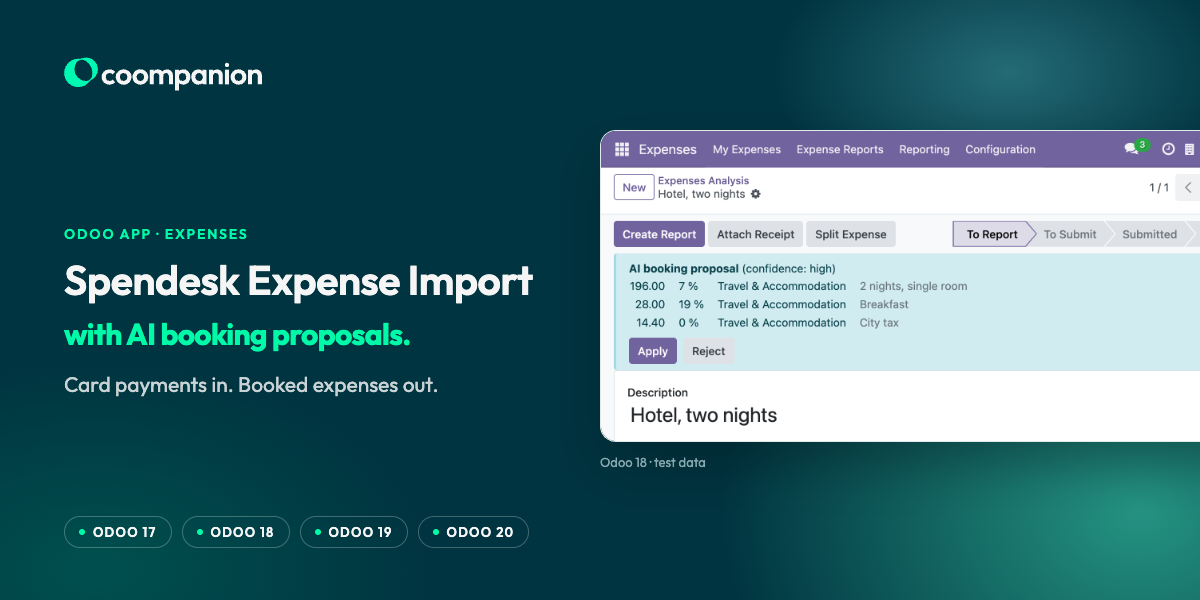
- AI proposals (optional): split by tax rate according to the receipt, tips as their own line without tax, hotel nights, extras and city tax separated.
- AI proposals: deposit refunds at another tax rate as negative lines, discounts netted.
- AI proposals: business entertainment split into deductible and non-deductible part on the accounts you choose (e.g. 70/30).
- AI proposals: notes for what accounting must check, such as missing receipts, receipt not matching the payment, or missing entertainment details.
- Apply, Reject or Undo per expense or for many at once. Sums always match the card charge.
- Add your own house rules in plain language.
- Learns from corrections: when accounting changes a category, a supplier rule is suggested. Active rules are passed to the AI.
- Optional auto-apply for proposals with high confidence and no note. Undo stays possible.
How it works.
- 01Expenses → Configuration → Settings → Card payment import: optionally enable AI, choose the provider and enter your API key.
- 02Expenses → My Expenses → Import card payments: upload the Spendesk ZIP.
- 03Filter “AI proposal open”, review, apply.
Requirements.
- Odoo 20, Community or Enterprise
- Odoo Expenses app (hr_expense)
- Spendesk export of card payments (ZIP with CSV and receipts)
- For AI proposals (optional): your own API key for Claude, OpenAI, Gemini or an OpenAI-compatible endpoint
- Available for Odoo Online, Odoo.sh and on-premise (per the Odoo Apps Store)
Screenshots.
FAQ.
Does the import work without AI?
Yes. AI proposals are off by default. Without an API key the import works fully without AI.
Which data is sent to the AI provider?
Only when you enable AI proposals: receipts and payment data, sent with your own API key to the provider you choose (Anthropic, OpenAI, Google or your own OpenAI-compatible endpoint).
What happens if I import the same file twice?
Nothing is duplicated: payments that were already imported are skipped.
Can I take back an applied AI proposal?
Yes. Proposals can be undone per expense or for many at once, including after auto-apply.
Support.
Questions about the installation or about fitting the app into your processes? Write to us.